Transaction categorization
Transaction categories · Categorizing transactionsTransaction categorization is assigning each transaction to a category, such as groceries or gas, so a spending line in a budget can count it. A transaction with no category is still spending, and still in the month's total, but no line counts it.
What is transaction categorization?
A category is a name for a kind of spending, given to each transaction. A transaction carries one category; a spending line in a budget claims one or more categories, and the transactions in those categories are what it counts. The category is the link between a purchase and the line it is measured against.
A transaction gets its category in one of a few ways: a rule that matches the merchant's description, a list of known merchants, the category the same merchant was given before, or a person setting it by hand. A transaction none of these reach is uncategorized until someone assigns it.
A split gives one transaction more than one category, each part with its own amount, so a warehouse run can count as part groceries and part household supplies. The parts add up to the original amount.
How transaction categorization works, with numbers
A plan sets $600 for groceries. Over the month, 14 grocery-store charges add up to $580, and three of them, $95 together, arrived with no category. The groceries line counts the 11 it can, $485, and reads $115 under plan.
Once the three are assigned to groceries, the line counts $580 and reads $20 under plan. The month's total spending is the same either way; what changes is which line the $95 counts against.
- Planned for groceries
- $600
- Assigned to the line
- − $485
- Under plan, as it reads
- $115
- Uncategorized grocery spending
- − $95
- Under plan, once assigned
- $20
Why transaction categorization matters
A line's spent figure counts only the transactions that carry its categories. In the example the groceries line reads $115 under plan while $95 of groceries sits uncategorized, and the position once assigned is $20 under. Uncategorized spending is the gap between what the month's total says was spent and what the lines together account for.
A rule carries into the next month: a charge from a merchant the rule matches arrives with its category, and the line counts it without anyone touching it.
Transaction categorization in Taiga Finance
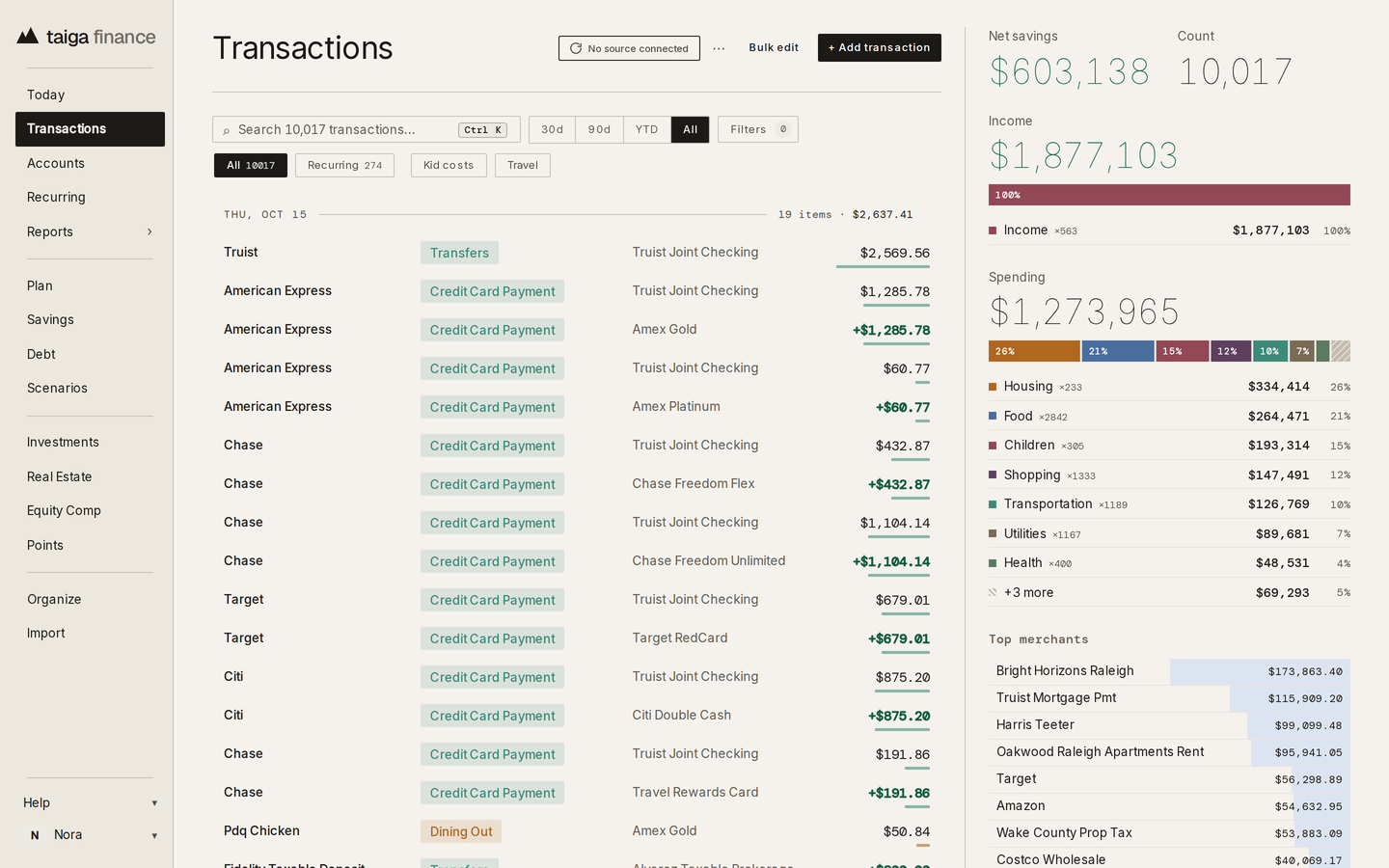
In Taiga Finance, each row on the Transactions ledger carries a category chip beside its merchant, account and amount, and a spending line on the Plan claims one or more categories, listed under “Categories” in the line's panel. Taiga Finance starts with 15 parent categories and 47 subcategories, sets a category as each transaction arrives, and marks a transaction it can't place “Uncategorized”; a category set by hand is never overwritten. A rule renames a merchant, sets a category, applies a tag or splits a transaction each time a matching one arrives. A split gives each part its own category, marked “Split 1/2” and “Split 2/2” in the ledger, and each part counts toward its own category on the Plan.
An uncategorized transaction counts as spending. While any remain, the ledger shows an “Uncategorized” chip with their count, and the transaction's panel reads “Uncategorized — add a rule?”. On the Plan, spending no other line claims goes to the catch-all line, such as “Everything else”, whose panel reads “Absorbs spending no other line claims.” and shows an “Absorbed this month” figure. Spending that hits no line shows in an “Unbudgeted” panel in the Spending section, counting the transactions and their total, and as an “Unbudgeted” row on the rail with the amount and the count; without a catch-all, the panel offers “Add an Everything else line”.
Plan & goals →Key takeaways: Transaction categorization
- Transaction categorization assigns each transaction to a category so a spending line can count it.
- An uncategorized transaction is still spending and still in the month's total, but no line counts it, so the line reads further under plan than it is.
- A split gives one transaction several categories, each part with its own amount.
- In Taiga Finance, a transaction nothing matched is marked Uncategorized, and spending that hits no Plan line shows as Unbudgeted.
Questions about Transaction categorization
What is transaction categorization?
Assigning each transaction to a category, such as groceries or gas, so a spending line in a budget can count it. The category is the link between a purchase and the line it is measured against.
What happens to an uncategorized transaction in a budget?
It stays in the month's total spending, but no line counts it, so the line it belongs to reads further under plan than it is. In the example, $95 of uncategorized groceries makes a $20-under line read $115 under.
Does Taiga Finance categorize transactions automatically?
Yes. As a transaction arrives, Taiga Finance checks the household's rules, then its built-in keyword and bank-pattern lists, then the category the same merchant was given before, and marks the ones it can't place Uncategorized. A category set by hand is never overwritten, and a rule sets a category each time a matching transaction arrives.